-p-2000.png)


Webflow's AI Features in 2026: The Complete Rundown — and Which Ones Actually Help

The Honest Answer, Before You Read Further
If you only have thirty seconds:
- The boring features are the real wins. AI meta tags, schema, alt text, and translation quietly save hours every week. Nobody makes a launch video about them.
- The flashy one is the most oversold. "Build a site from a prompt" is a fantastic starting point and a terrible finished product. Great for pitching, not for shipping.
- AI does the grunt work. Humans keep the judgment. Use it for drafts, variants, and hygiene. Keep people on brand, structure, and being found.
- It's on every plan now. As of 2026, Webflow AI reaches every tier, including free — so "should we pay for it" isn't the question. "Which parts do we trust" is.
The rundown is below, then our filter: use daily, useful with a catch, or just a good demo.
A thread went around r/webflow that just listed every AI feature Webflow now ships, then asked one question: "Which do you actually use?"
Good question. Because the list is long now, and the demos all look incredible.
We build on Webflow every day, for real clients, on deadlines. So here's the complete rundown — followed by the part the demos skip: which of these earn their place in a real workflow, and which are a great party trick you'll use once.
The Complete Rundown: Every Webflow AI Feature in 2026
Here's the full list, grouped so it's actually readable.
1 . AI Site Builder (Prompt-to-Production). Describe your business and it generates a multi-page starter site — sitemap, design system, page layouts. The "evolved" version rolled out to all customers in early 2026.
2. AI Assistant in the Designer. A conversational agent that reads your site's classes and CMS. It generates sections, refactors layouts, drafts CMS content, and suggests SEO fixes without leaving the canvas.
3. AI-generated CMS content. Fills collection items — titles, body copy, product descriptions, meta — across a whole collection at once.
4. AI code components. Describe an interactive piece (a calculator, a multi-step form) and it generates a React component. Part of the broader prompt-to-production push, including apps deployed to Webflow Cloud.
5. Webflow Optimize. AI-run A/B testing and personalization (built on the Intellimize acquisition) — auto-generates and tests headline, CTA, and layout variants, and serves different content to different segments.
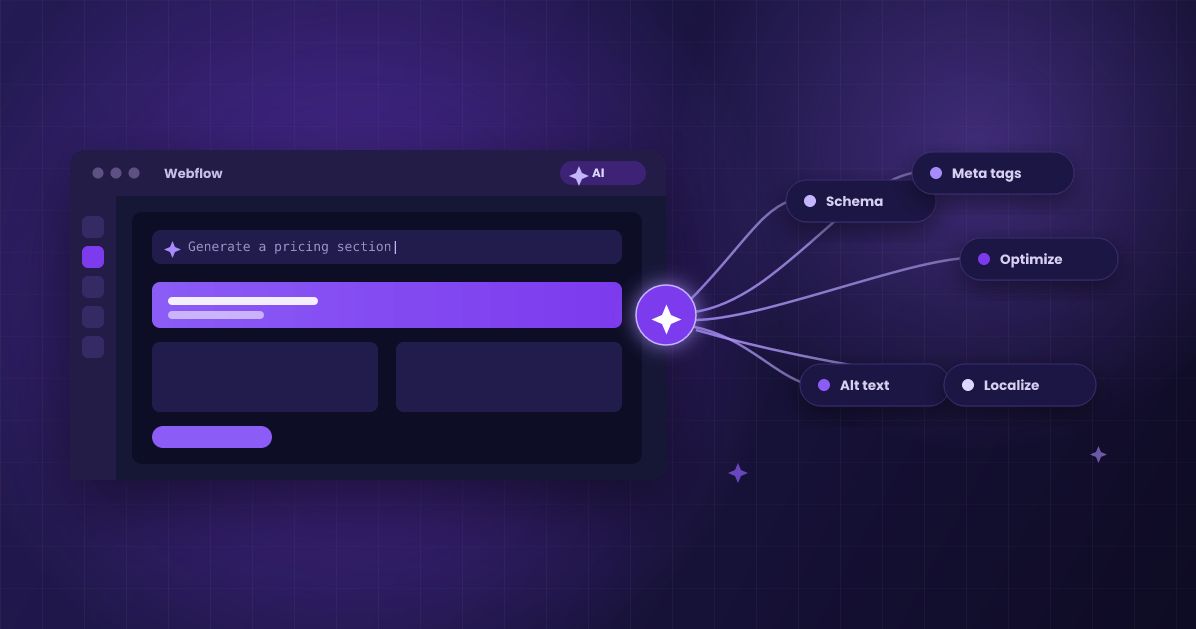
6. AI SEO and AEO tools. One-click meta titles and descriptions, schema/structured-data generation, sitewide SEO audits, plus newer answer-engine features: AI visibility analytics, AI referral tracking, and llms.txt support.
7. AI translation and localization. Machine translation for both static pages and dynamic CMS content, adjusted for locale rather than word-for-word.
8. AI alt text. Audits your whole site for missing alt text and generates it in bulk from the image content.
9. AI copywriting assistant. Inline text generation and editing — rewrite, shorten, change tone, kill the lorem ipsum — inside both the Designer and Editor.
10. MCP / external AI agents. Connect tools like Claude to run bulk operations, restructure SEO, or turn AI-generated HTML into Webflow.
11. AEO analytics. The newer answer-engine layer — track how your content surfaces in ChatGPT, Claude, and Gemini, and benchmark against competitors.
That's the list. Now the part you came for.
Our Agency Filter: Use Daily, Useful With a Catch, or Just a Good Demo
We've run all of these on real builds. Here's where each one honestly lands.
Tier 1 — Use every day. These save real time and rarely embarrass you.
1. AI SEO/AEO hygiene (meta, schema, alt text). The quiet MVP. It handles the tedious technical work that humans skip when they're busy, and it does it accurately enough to ship.
2. AI translation and localization. Genuinely cuts a localization project from weeks to days. Native review still matters for legal or brand-critical copy, but the bulk is done.
3. AI copywriting for microcopy. Headlines, CTAs, button labels, realistic placeholder copy. Give it a clear audience and tone and it's fast and good.
4. AI Assistant for common sections. Hero, feature grid, pricing, testimonials — it scaffolds the patterns you'd build anyway, respecting your existing classes.
Tier 2 — Useful, with a catch. Real value, but only under a condition.
1. Webflow Optimize. Powerful, but only on sites with real traffic. Low-traffic pages won't get a clean signal, and the AI's variant suggestions are only as good as your underlying content.
2. AI-generated CMS content. Great for short, structured entries — product cards, FAQ answers, summaries. For anything with expertise, it drafts fast and needs a human to make it true and on-brand.
3. AI code components. A useful scaffold for standard components. For anything custom, treat it as a first draft a developer reviews — not final code.
Tier 3 — A great demo, not a shortcut yet. Impressive in a video, thin in production.
1. AI Site Builder / Prompt-to-Production. Reviewers put it around 8/10, and that's fair — for a starting point. It's excellent for exploring directions and pitching. It is not a finished site. Brand, accessibility, performance, and real information architecture are still human work.
2. AEO analytics. New and evolving. Useful as directional data — which way the wind's blowing on AI search — but don't treat the numbers as gospel yet.
The Two Calls We'd Stake Our Name On
Two of these deserve a stronger opinion than a tier.
The quiet winner: AI SEO and AEO. This is the feature everyone under-rates because it isn't fun to demo. But schema generation, clean meta, and bulk alt text are exactly what decide whether your site gets found — in Google and in AI answers. In a year where AI Overviews sit on a huge share of searches, the unglamorous SEO tooling is the highest-return AI feature Webflow ships. If you use one thing on this list seriously, use this.
The most overrated: the AI Site Builder. Not because it's bad — because of what people expect from it. "Type a prompt, get a website" sounds like the end of the build. It's the first ten minutes of the build. The prompt gives you a credible draft; everything that makes a site actually convert and rank still happens after. Treat it as a fast first sketch and it's genuinely useful. Treat it as a finished site and you'll ship something generic.
How We Actually Use Webflow AI
Here's the workflow, stripped down.
We let AI do the grunt work: draft the meta and alt text, generate the boilerplate sections, translate the pages, write the first-pass microcopy, scaffold the standard components.
We keep humans on the things that decide whether the site works: brand voice, information architecture, accessibility, performance, and the technical SEO that gets you cited.
That's the whole philosophy. AI is the fastest junior on the team — great at volume, needs a senior reviewing the output. The agencies getting burned are the ones who mistook the junior for the whole team.
Where We Land
Webflow's AI isn't hype and it isn't magic. It's a genuinely strong set of tools where the value is inverted from the marketing.
The features that get the launch videos — build a site from a prompt — are the ones to use with the most caution. The features nobody mentions — schema, alt text, meta, translation — are the ones we'd fight to keep.
Use the boring ones every day. Use the flashy one as a sketchpad. Keep a human on anything that decides whether you get found.
Work With Us
We build on Webflow every day — and we know which AI features to lean on and which to babysit. If you want a site that uses the good parts and skips the traps, that's what we do.
Staring at the feature list wondering what's worth turning on? That's a quick conversation. Let's talk.
Let's Talk
Talk to a Webflow ExpertLet's Talk
Talk to a Webflow ExpertFAQ
What are all of Webflow's AI features in 2026?
As of 2026, Webflow's AI set includes: the AI Site Builder (prompt-to-production site generation), the AI Assistant in the Designer, AI-generated CMS content, AI code components, Webflow Optimize (AI A/B testing and personalization), AI SEO/AEO tools (meta, schema, audits, AI visibility and referral analytics, llms.txt), AI translation and localization, AI alt text, an inline AI copywriting assistant, and MCP/external agent integrations like Claude. Most are generally available, and AI now reaches every plan, including free.
Which Webflow AI features are actually worth using?
The unglamorous ones. In daily agency use, the biggest wins are AI SEO/AEO hygiene (meta, schema, alt text), translation and localization, and AI copywriting for microcopy — they save real hours and rarely misfire. Webflow Optimize, AI-generated CMS content, and AI code components are useful with a catch (traffic, editing, and developer review, respectively). The AI Site Builder is best treated as a fast first draft, not a finished site.
Can Webflow's AI Site Builder build a finished website?
No — it builds a strong starting point, not a finished site. It generates a multi-page draft with a sitemap, design system, and layouts from a prompt, which is excellent for exploring directions and pitching. But brand voice, accessibility, performance, real information architecture, and technical SEO still need human work before it's ready to ship. Reviewers rate it well as a prototyping tool, not as a hands-off builder.
Is Webflow AI free, and what does it cost?
As of 2026, Webflow AI reaches every plan, including the free Starter tier, with AI credits included across Workspace plans and add-ons for heavier usage. Some AI SEO/AEO tools require a paid site or workspace, similar to existing SEO features. The practical takeaway: cost is rarely the deciding factor anymore — which features you actually trust is.
Does Webflow AI help with SEO and AEO?
Yes, and this is its most underrated strength. Webflow's AI can generate meta titles and descriptions, build and audit schema/structured data, bulk-generate alt text, and — through newer answer-engine features — track how your content appears in AI assistants and where AI referral traffic comes from. The schema and meta tooling in particular does the technical work that decides whether you get found in both Google and AI answers.
Should I let Webflow AI write my content?
For microcopy, product cards, FAQ answers, and first drafts — yes, it's fast and solid. For anything requiring real expertise, brand voice, or accuracy, use it to draft and then have a human edit. Left unsupervised on longer content, AI output tends toward generic and repetitive. The rule we use: AI writes the first version, a person makes it true and on-brand.
Marketing Team
Publisher
A thread went around r/webflow that just listed every AI feature Webflow now ships, then asked one question: "Which do you actually use?"
Good question. Because the list is long now, and the demos all look incredible.
We build on Webflow every day, for real clients, on deadlines. So here's the complete rundown — followed by the part the demos skip: which of these earn their place in a real workflow, and which are a great party trick you'll use once.
The Complete Rundown: Every Webflow AI Feature in 2026
Here's the full list, grouped so it's actually readable.
1 . AI Site Builder (Prompt-to-Production). Describe your business and it generates a multi-page starter site — sitemap, design system, page layouts. The "evolved" version rolled out to all customers in early 2026.
2. AI Assistant in the Designer. A conversational agent that reads your site's classes and CMS. It generates sections, refactors layouts, drafts CMS content, and suggests SEO fixes without leaving the canvas.
3. AI-generated CMS content. Fills collection items — titles, body copy, product descriptions, meta — across a whole collection at once.
4. AI code components. Describe an interactive piece (a calculator, a multi-step form) and it generates a React component. Part of the broader prompt-to-production push, including apps deployed to Webflow Cloud.
5. Webflow Optimize. AI-run A/B testing and personalization (built on the Intellimize acquisition) — auto-generates and tests headline, CTA, and layout variants, and serves different content to different segments.
6. AI SEO and AEO tools. One-click meta titles and descriptions, schema/structured-data generation, sitewide SEO audits, plus newer answer-engine features: AI visibility analytics, AI referral tracking, and llms.txt support.
7. AI translation and localization. Machine translation for both static pages and dynamic CMS content, adjusted for locale rather than word-for-word.
8. AI alt text. Audits your whole site for missing alt text and generates it in bulk from the image content.
9. AI copywriting assistant. Inline text generation and editing — rewrite, shorten, change tone, kill the lorem ipsum — inside both the Designer and Editor.
10. MCP / external AI agents. Connect tools like Claude to run bulk operations, restructure SEO, or turn AI-generated HTML into Webflow.
11. AEO analytics. The newer answer-engine layer — track how your content surfaces in ChatGPT, Claude, and Gemini, and benchmark against competitors.
That's the list. Now the part you came for.
Our Agency Filter: Use Daily, Useful With a Catch, or Just a Good Demo
We've run all of these on real builds. Here's where each one honestly lands.
Tier 1 — Use every day. These save real time and rarely embarrass you.
1. AI SEO/AEO hygiene (meta, schema, alt text). The quiet MVP. It handles the tedious technical work that humans skip when they're busy, and it does it accurately enough to ship.
2. AI translation and localization. Genuinely cuts a localization project from weeks to days. Native review still matters for legal or brand-critical copy, but the bulk is done.
3. AI copywriting for microcopy. Headlines, CTAs, button labels, realistic placeholder copy. Give it a clear audience and tone and it's fast and good.
4. AI Assistant for common sections. Hero, feature grid, pricing, testimonials — it scaffolds the patterns you'd build anyway, respecting your existing classes.
Tier 2 — Useful, with a catch. Real value, but only under a condition.
1. Webflow Optimize. Powerful, but only on sites with real traffic. Low-traffic pages won't get a clean signal, and the AI's variant suggestions are only as good as your underlying content.
2. AI-generated CMS content. Great for short, structured entries — product cards, FAQ answers, summaries. For anything with expertise, it drafts fast and needs a human to make it true and on-brand.
3. AI code components. A useful scaffold for standard components. For anything custom, treat it as a first draft a developer reviews — not final code.
Tier 3 — A great demo, not a shortcut yet. Impressive in a video, thin in production.
1. AI Site Builder / Prompt-to-Production. Reviewers put it around 8/10, and that's fair — for a starting point. It's excellent for exploring directions and pitching. It is not a finished site. Brand, accessibility, performance, and real information architecture are still human work.
2. AEO analytics. New and evolving. Useful as directional data — which way the wind's blowing on AI search — but don't treat the numbers as gospel yet.
The Two Calls We'd Stake Our Name On
Two of these deserve a stronger opinion than a tier.
The quiet winner: AI SEO and AEO. This is the feature everyone under-rates because it isn't fun to demo. But schema generation, clean meta, and bulk alt text are exactly what decide whether your site gets found — in Google and in AI answers. In a year where AI Overviews sit on a huge share of searches, the unglamorous SEO tooling is the highest-return AI feature Webflow ships. If you use one thing on this list seriously, use this.
The most overrated: the AI Site Builder. Not because it's bad — because of what people expect from it. "Type a prompt, get a website" sounds like the end of the build. It's the first ten minutes of the build. The prompt gives you a credible draft; everything that makes a site actually convert and rank still happens after. Treat it as a fast first sketch and it's genuinely useful. Treat it as a finished site and you'll ship something generic.
How We Actually Use Webflow AI
Here's the workflow, stripped down.
We let AI do the grunt work: draft the meta and alt text, generate the boilerplate sections, translate the pages, write the first-pass microcopy, scaffold the standard components.
We keep humans on the things that decide whether the site works: brand voice, information architecture, accessibility, performance, and the technical SEO that gets you cited.
That's the whole philosophy. AI is the fastest junior on the team — great at volume, needs a senior reviewing the output. The agencies getting burned are the ones who mistook the junior for the whole team.
Where We Land
Webflow's AI isn't hype and it isn't magic. It's a genuinely strong set of tools where the value is inverted from the marketing.
The features that get the launch videos — build a site from a prompt — are the ones to use with the most caution. The features nobody mentions — schema, alt text, meta, translation — are the ones we'd fight to keep.
Use the boring ones every day. Use the flashy one as a sketchpad. Keep a human on anything that decides whether you get found.
Work With Us
We build on Webflow every day — and we know which AI features to lean on and which to babysit. If you want a site that uses the good parts and skips the traps, that's what we do.
Staring at the feature list wondering what's worth turning on? That's a quick conversation. Let's talk.
Let's Talk
Button TextFAQ
What are all of Webflow's AI features in 2026?
As of 2026, Webflow's AI set includes: the AI Site Builder (prompt-to-production site generation), the AI Assistant in the Designer, AI-generated CMS content, AI code components, Webflow Optimize (AI A/B testing and personalization), AI SEO/AEO tools (meta, schema, audits, AI visibility and referral analytics, llms.txt), AI translation and localization, AI alt text, an inline AI copywriting assistant, and MCP/external agent integrations like Claude. Most are generally available, and AI now reaches every plan, including free.
Which Webflow AI features are actually worth using?
The unglamorous ones. In daily agency use, the biggest wins are AI SEO/AEO hygiene (meta, schema, alt text), translation and localization, and AI copywriting for microcopy — they save real hours and rarely misfire. Webflow Optimize, AI-generated CMS content, and AI code components are useful with a catch (traffic, editing, and developer review, respectively). The AI Site Builder is best treated as a fast first draft, not a finished site.
Can Webflow's AI Site Builder build a finished website?
No — it builds a strong starting point, not a finished site. It generates a multi-page draft with a sitemap, design system, and layouts from a prompt, which is excellent for exploring directions and pitching. But brand voice, accessibility, performance, real information architecture, and technical SEO still need human work before it's ready to ship. Reviewers rate it well as a prototyping tool, not as a hands-off builder.
Is Webflow AI free, and what does it cost?
As of 2026, Webflow AI reaches every plan, including the free Starter tier, with AI credits included across Workspace plans and add-ons for heavier usage. Some AI SEO/AEO tools require a paid site or workspace, similar to existing SEO features. The practical takeaway: cost is rarely the deciding factor anymore — which features you actually trust is.
Does Webflow AI help with SEO and AEO?
Yes, and this is its most underrated strength. Webflow's AI can generate meta titles and descriptions, build and audit schema/structured data, bulk-generate alt text, and — through newer answer-engine features — track how your content appears in AI assistants and where AI referral traffic comes from. The schema and meta tooling in particular does the technical work that decides whether you get found in both Google and AI answers.
Should I let Webflow AI write my content?
For microcopy, product cards, FAQ answers, and first drafts — yes, it's fast and solid. For anything requiring real expertise, brand voice, or accuracy, use it to draft and then have a human edit. Left unsupervised on longer content, AI output tends toward generic and repetitive. The rule we use: AI writes the first version, a person makes it true and on-brand.
Marketing Team
Publisher


Hi, I'm Mike!
If you are enjoying the article, feel free to subscribe to our monthly newsletter.
If you have any project requirements, please contact us.