
.webp)
TL;DR
Webflow AI ("Prompt-to-Production," launched at Webflow Conf 2025) turns a single prompt into a real, multi-page Webflow site — with a Flowkit design system, editable themes, GSAP animation, and generated copy and images. It's a genuine leap past the throwaway AI builders of a few years ago. But it builds a strong first draft, not a finished business site: the copy is generic, images are placeholders, and SEO/AEO, CMS architecture, conversion design, and custom functionality still need a human. Best used as an accelerator — AI for the sprint, expertise for the finish.
Webflow AI Prompt-to-Production: the short answer
Yes, Webflow AI can generate a working, multi-page website from a prompt in minutes — and unlike older AI builders, the output is a real Webflow project you can keep refining, not a mockup you throw away.
But "production-ready draft" and "launch-ready business site" are two different things. Webflow AI handles the fast, structural first 60% of a build. The remaining 40% — positioning, conversion, CMS architecture, real SEO/AEO, and anything custom — is still human work. That 40% is also where the results actually come from.
What is Webflow AI Prompt-to-Production?
Webflow unveiled Prompt-to-Production at Webflow Conf in September 2025, calling it an "agentic solution" that lets teams generate production-grade apps and publish them with one click inside the same visual environment they already use.
The pitch is aimed squarely at a gap other AI tools leave open:
- The problem it targets: most code-gen tools produce a first draft in minutes, but getting to the "last mile" — a real, on-brand, launch-ready site — can take weeks.
- What's bundled in: app generation, content design, SEO, Answer Engine Optimization (AEO), and publishing, all in one platform.
- Named use cases: pricing calculators, job boards, dashboards — the kind of thing that used to take weeks of cross-functional effort.
"The conversation is shifting from what AI can generate, to what AI can ship to production. Most code gen tools create a first draft in minutes, but it can take weeks to get to the last mile." — Rachel Wolan, Chief Product Officer, Webflow
For context on scale: over 300,000 companies and 1,500+ Certified Partners build on Webflow, which was last valued around $4B. This isn't a fringe experiment — it's the direction of a major platform.
What Webflow AI actually builds
This is where the 2026 version genuinely impresses. From one prompt, you get:
- A functional, multi-page site — not a single landing page. Webflow's examples produce Home, About, and Services pages with real sections, not empty boxes.
- A real design system on Webflow Flowkit — Webflow's modular CSS framework. Colors, spacing, type, and buttons are connected through shared logic, so changing a primary color once updates it everywhere.
- 8 editable theme categories + GSAP animation presets — colors, buttons, typography, images, and motion that feels designed, not default.
- Generated copy and images — so the first draft looks real, not empty. Great for getting stakeholder buy-in fast.
- Full native Webflow underneath — CMS, hosting, SEO controls, interactions, the Designer canvas. You're not trapped in a limited sandbox; you get a normal Webflow project that happened to be built quickly.
How it works: the 4-step flow
Webflow lays the process out in four stages, and in practice it follows this shape:
- Describe — you explain what you're building and who it's for; Webflow AI creates an editable draft.
- Structure — add, remove, or reorder sections and pages.
- Customize — adjust styles, colors, typography, and elements across the site.
- Refine — extend and optimize using the full power of Webflow.
Here's the honest read: steps 1 and 2 are where the AI saves real time. Steps 3 and 4 are where skill decides whether the site is good or merely fine.
Where Webflow AI falls short
None of these are reasons to avoid the tool — they're the gaps you plan around so the final site holds up.
- It's a starting point, not a finished website. Webflow itself frames the output as a draft. The structure is sensible but not strategic.
- The copy is generic. It describes a business in the abstract. It doesn't know your differentiators, pricing logic, or the exact words your buyers use.
- The images are placeholders. Fine at a glance, but they're not your product, team, or real work — and authentic imagery outperforms generic fills with both visitors and search.
- SEO and AEO depth is still manual. You get a clean technical base, but title tags, schema, internal linking, and content that answers real intent are deliberate work.
- CMS architecture for scale needs planning. The AI can generate CMS items, but designing collections and relationships that scale is an architecture decision — get it wrong early and you pay in painful migrations.
- Conversion design isn't included. Looks good ≠ books demos. Value props, trust signals, and tested layouts come from understanding user behavior, not a prompt.
- Brand differentiation is limited. Many sites start from the same Flowkit base and similar prompts — so AI-generated sites can drift toward a recognizable sameness.
- Complex functionality still needs a developer. Complex setups—like gating content with Memberstack, syncing dynamic customer data out to HubSpot or Salesforce, or connecting external low-code databases like Airtable and Xano—still demand manual structural engineering.
- It only works on brand-new sites. Webflow's AI site builder can't be applied to an existing site — only a new one (or an existing AI-generated one).
What it delivers vs. what still needs a human
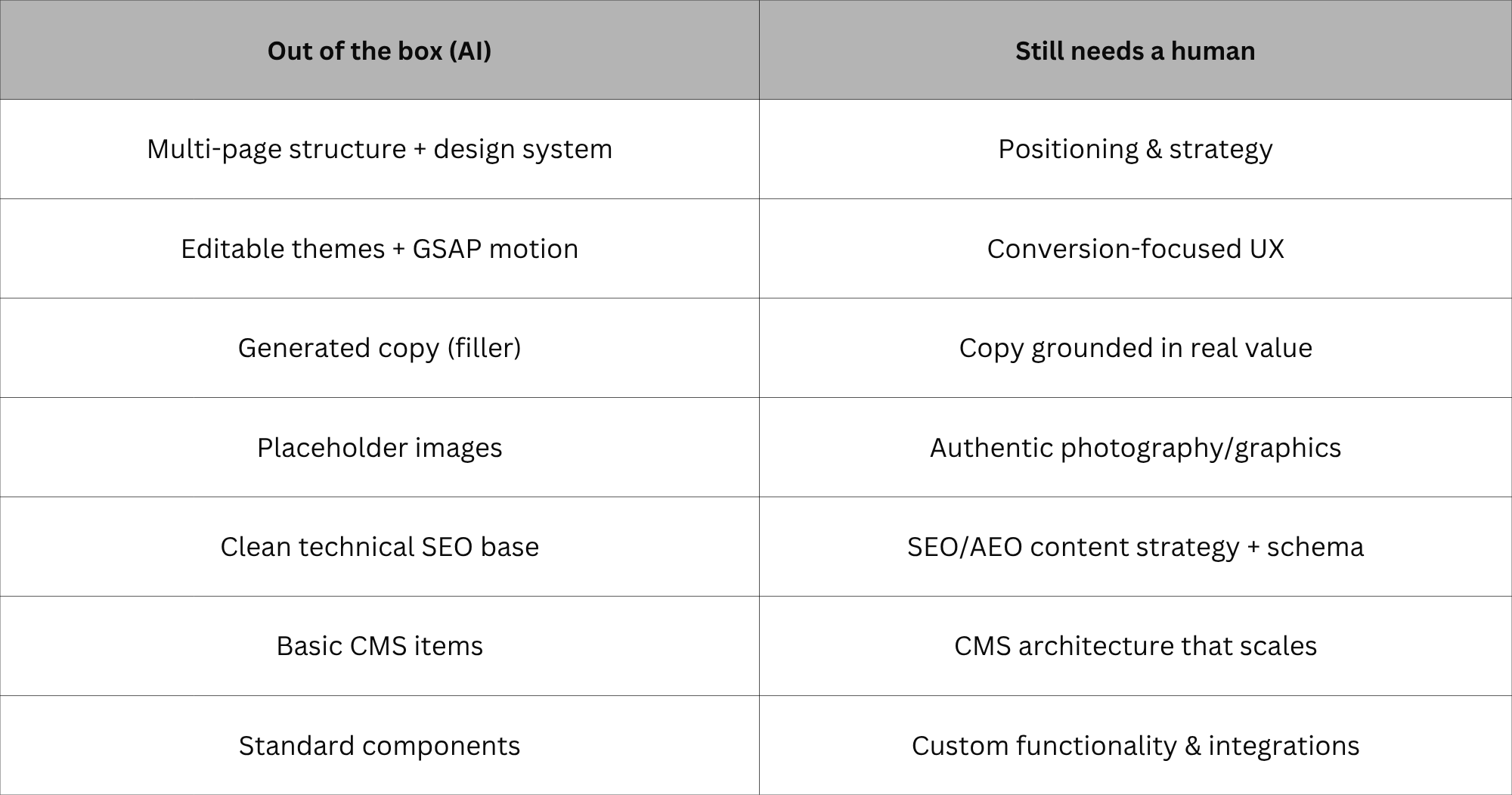
Who Webflow AI is genuinely good for
Based on how it behaves across real projects, it fits a few situations very well:
- Founders who need a first draft to react to. Seeing a real layout beats staring at a blank canvas — and you get there in minutes.
- Agencies and freelancers compressing the kickoff phase. Generate a base, then spend hours on what clients actually pay for: strategy, custom design, and conversion.
- Marketing teams that need a page fast — and have a Webflow person to finish it. The structure arrives quickly; a skilled hand makes it convert.
The real 2026 workflow: AI start, expert finish
After running this kind of tool across many briefs, one pattern produces the best results consistently: let the AI do what it's good at, then bring in skill for what it can't.
- Use the AI to generate the first structural draft and align stakeholders fast.
- Keep the Flowkit foundation — it's genuinely well built.
- Then replace generic copy with real positioning, swap placeholder images for authentic visuals, architect the CMS for how you actually publish, layer in proper SEO and AEO, and design the conversion paths that match your funnel.
- Finally, add the custom functionality and integrations your business depends on.
This is the same division of labor the most effective teams already use — and it's why "AI-built" and "agency-built" aren't opposites. The strongest sites in 2026 are both.
Does Webflow AI replace your agency or developer?
Here's the reframe most takes miss. Everyone's asking "can AI build the site now?" The sharper question is where the value moved.
- Webflow AI now does the first 60% — structure, draft, design system — in minutes.
- That makes the 40% it can't do — positioning, conversion, CMS architecture, real SEO/AEO, custom builds — the entire job you're actually hired for.
The AI didn't remove the work. It compressed the commodity part and raised the value of the finish. For a business, that's good news: you get to a real draft faster and the expensive, differentiating work is exactly what still moves the needle. Clients were never buying "a layout." They were buying a site that converts and that their team can run — and that's still human.
The verdict
Webflow AI in 2026 is a genuinely strong tool, and the honest framing is the useful one. It builds a functional, multi-page website on a real design system, with editable themes, GSAP animation, generated content, and the full power of Webflow underneath. That's a real leap beyond the gimmicky AI builders of a few years ago.
Where it falls short is equally clear: it produces a starting point, not a finished business site. The copy is generic, the images are placeholders, the SEO/AEO depth is manual, the CMS needs real architecture, conversion design is absent, and anything specific to your business still needs a developer.
Use the AI for the sprint at the start, and bring in expertise for the finish. That's not a knock on the tool — it's how you get the most out of it.
Close
Every year there's a tool that's supposed to make agencies obsolete. Webflow AI is the most impressive one yet — and it still hands you a draft, not a finished site. The work didn't disappear; it moved to the part that actually decides whether a website performs.
That's the part we do. Thinking about using Webflow AI for your next site — or wondering whether an AI-built draft is ready to launch? Talk to Seattle New Media for a straight answer and a site that's built to convert, not just to look fast.

Frequently asked questions
What is Webflow AI Prompt-to-Production?
It's Webflow's agentic AI system, launched at Webflow Conf 2025, that generates production-grade, multi-page sites and apps from a prompt and lets you publish them with one click inside Webflow — bundling app generation, content, SEO, and AEO in one platform.
What does Webflow AI actually build?
A functional, multi-page Webflow site from a single prompt — built on the Webflow Flowkit design system, with eight editable theme categories, GSAP animation presets, and generated copy and images, opening directly in the Designer as an editable draft.
Is a Webflow AI site ready to launch as-is?
Not for most businesses. It's an excellent first draft, but the copy is generic, images are placeholders, and SEO/AEO, CMS architecture, and conversion elements need human work. Treat it as a head start, not a finished site.
Can Webflow AI replace a Webflow agency or developer?
No — it changes where the effort goes. The AI handles the fast, repetitive structural build; strategy, custom design, SEO/AEO, CMS architecture, and custom functionality still need a professional. The combination is faster and stronger than either alone.
Can I use Webflow AI on my existing website?
No. The AI site builder only works when creating a brand-new site (or editing an existing AI-generated one) — it can't be applied to an existing hand-built site.
Does Webflow AI handle SEO and AEO automatically?
It gives you a clean technical base and native SEO/AEO controls, and the AI can assist — but ranking and getting cited by AI answer engines still require deliberate content, schema, and internal-linking work.





.svg)


