
-p-2000.png)


No-Code Integrations That Save Time for Agencies
.webp)
Agencies run on tight timelines. Every hour spent on manual data entry, chasing client approvals, or copy-pasting information between tools is an hour not spent on actual work.
That's exactly the problem no-code integrations solve. They connect the tools your agency already uses Webflow, HubSpot, Airtable, Zapier, Make, Salesforce, and automate the tedious work in between. No developer needed. No custom code. No waiting.
This guide breaks down the most effective no-code integrations for agencies in 2025, which tools to use, and where to start, whether you're a founder, project manager, or the person your team turns to when something needs to be automated.
Quick answer: The best no-code integrations for agencies connect your CRM, project management, CMS, and communication tools so data flows automatically between them, cutting repetitive tasks and reducing human error.
What Are No-Code Integrations?
A no-code integration connects two or more software tools without requiring you to write any code. Instead of a developer building a custom bridge between your CRM and your project management tool, you use a visual platform to set up rules like: "When a new lead is added in HubSpot, create a project in Airtable."
The key platforms agencies rely on are:
Each has its strengths. Together, they form the backbone of a well-automated agency.
Why Agencies Specifically Benefit From No-Code Automation
Agencies deal with a specific type of chaos: multiple clients, multiple tools, constant context-switching, and a team that can't afford to be blocked by IT bottlenecks.
According to Gartner, 70% of new enterprise applications will use no-code or low-code tools, that up from under 25% just five years ago. The reason is simple: speed and cost.
For agencies specifically, the wins are:
- Less time on manual work means more time on billable work
- Fewer errors from copy-pasting between tools
- Faster client onboarding and reporting
- Easier handoffs between team members
- Scalability without adding headcount
Top No-Code Integrations That Save Time for Agencies
1. Zapier: The Glue Between Everything
Zapier is the most widely used automation platform for a reason: it connects over 6,000 apps and is simple enough for a non-technical project manager to set up in an afternoon.
Most useful agency automations with Zapier:
• New HubSpot lead → Create Airtable record + send Slack notification to sales team
• New Typeform submission → Add client to HubSpot CRM + trigger welcome email sequence
• Completed task in Asana → Log hours in time-tracking tool automatically
• New Webflow CMS item published → Post to social media or notify client via email
Best for: Teams that want fast, reliable automations with minimal setup. Zapier's interface is the most beginner-friendly of the bunch.
2. Make (Integromat): For Complex, Multi-Step Workflows
Make is what you use when Zapier isn't powerful enough. It's a visual, flow-based automation builder that handles complex, multi-branch logic and it's significantly cheaper at higher volumes.
Where Make shines for agencies:
- Multi-step client reporting: pull data from multiple sources, format it, and send a branded report
- Advanced lead routing: score leads from HubSpot, route them to the right team member, and update Airtable, all in one flow
- Conditional logic: "If the project status is 'overdue' AND the client tier is 'enterprise', escalate to the account director"
Best for: Agencies that have outgrown Zapier's simpler format or need more control over logic, data transformation, and cost efficiency.
3. Airtable: Your Agency's Operational Brain
Airtable is a database that looks like a spreadsheet but behaves like a CRM, project tracker, and content calendar all at once. Its real power comes from integrating it with everything else.
High-value Airtable integrations for agencies:
- Connect Airtable to HubSpot so new clients automatically appear in your project tracker
- Link Airtable to Webflow CMS so content updates in one place sync to the other
- Use Airtable Automations (built-in) to send status update emails to clients at each project milestone
- Sync Airtable with Slack so team members get notified when their deliverable moves to 'Review'
Best for: Agencies that want one central source of truth for project data that also talks to their client-facing and dev tools.
4. Webflow Integrations: Build Sites That Do More
Webflow is a hub you can connect to almost any business tool. Agencies that build in Webflow can automate a lot of post-launch client work.
Useful Webflow integration agencies use:
- Webflow form submissions → HubSpot CRM (capture leads directly from client sites)
- Webflow CMS → Airtable (let non-technical clients update site content from a familiar spreadsheet-like interface)
- Webflow + Zapier → Slack (notify your team every time a form is submitted or a page is published)
- Webflow + Stripe → automated client billing on project milestones
Best for: Agencies doing Webflow builds who want to hand clients a site that's already connected to their tools not just a static website.
5. HubSpot & Salesforce: CRM That Actually Talks to Your Stack
A CRM is only useful if it's connected to the rest of your workflow. Most agencies set up HubSpot or Salesforce in isolation and then manually update it, which defeats the purpose.
The integrations that close this gap:
- New deal closed in HubSpot → Auto-create onboarding project in Airtable + assign team members
- Client email reply → Log it in HubSpot automatically via Gmail/Outlook sync
- Salesforce opportunity stage change → Trigger Make workflow to update project status, notify PM, and send client email
- HubSpot contact form → Slack alert to sales + automated follow-up email sequence
Best for: Agencies that want their CRM to actively drive operations rather than just sit as a record of what happened.
Zapier vs. Make: Which Should Your Agency Use?
This is the most common question agencies have when starting with automation. Here's the honest answer:
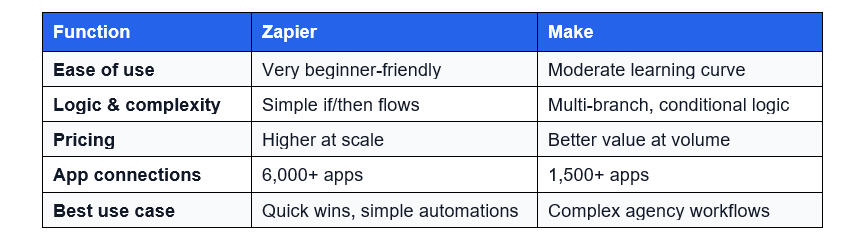
Most agencies start with Zapier and add Make once they hit automation complexity that Zapier can't handle cleanly. There's no reason to choose just one.
Where to Start: A Practical Approach for Agencies
The mistake most agencies make is trying to automate everything at once. Start small, prove the value, then expand.
1. Audit your most repetitive tasks. Write down the five things your team does manually every week that feel like a waste of time.
2. Pick one trigger-action pair. Example: "When a new client signs, create their project in Airtable." Build that first.
3. Measure time saved. Once you see 2–3 hours saved per week, use that as internal justification to automate the next workflow.
4. Build a stack, not a tangle. Document every automation you create. Undocumented automations break silently and nobody knows why.
Pro tip: Treat your automation stack like code. Version it, document it, and assign an owner. Automation that nobody understands will eventually cause more problems than it solves.
Common Agency Workflows Worth Automating Right Now
Not sure where to start? These are the highest-ROI automations for most agencies:
• Client onboarding: New contract signed → create project, send welcome email, set up Slack channel, assign team members, all automatically
• Lead capture: Website form submission → CRM entry + team Slack alert + automated follow-up sequence
• Reporting: Pull project status from Airtable → format into a client-ready weekly update → send via email on Friday at 9am
• Invoice triggers: Project milestone completed in Airtable → trigger invoice in Stripe or QuickBooks
• Content publishing: Blog post approved in Airtable → auto-publish to Webflow CMS + post link to Slack
Final Thoughts
No-code integrations don't replace the people in your agency; they remove the work that shouldn't require a person in the first place.
When your CRM talks to your project management tool, your website feeds your reporting, and your billing is triggered automatically, your team spends more time on the work clients actually pay for.
Start with one automation. Measure the time saved. Then build from there.
Want help setting up no-code integrations for your agency stack? Seattle New Media specializes in integrations for growing agencies and SaaS companies. Connect with us for more information.

FAQ
Do no-code integrations require a developer to set up?
No. Tools like Zapier, Make, and Airtable Automations are designed for non-developers. Project managers, operations leads, and even account managers can set up and maintain most agency automations without writing a single line of code.
What is the best no-code integration tool for agencies?
Choosing the best no-code integration tool depends on your complexity level. Zapier is the easiest to start with and has the most app connections. Make (Integromat) is better for complex, multi-step workflows at a lower cost. Most mature agencies use both.
Can I use Zapier and Make together?
Yes, and many agencies do. You might use Zapier for simple, fast automations and Make for the complex workflows that need conditional branching or large data volumes.
How does Webflow integrate with HubSpot?
Webflow form submissions can be sent directly to HubSpot as new contacts or deals via Zapier, Make, or HubSpot's native Webflow integration. This lets client websites capture leads directly into the agency's or client's CRM without any manual work.
Is Airtable good for agency project management?
Airtable is excellent for agencies because it's flexible enough to serve as a CRM, project tracker, and content calendar, and it integrates with nearly every other tool in an agency stack. Its built-in automations also reduce the need for external tools for simple workflows.
Publisher


Publisher
Subscribe to Seattle New Media Newsletter

Enter your details to get instant access
Get the File Now
If you'd like to download the file, enter your name and email below, and we'll send it directly to your inbox.
The file has been sent to your email. Please check your inbox!
Agencies run on tight timelines. Every hour spent on manual data entry, chasing client approvals, or copy-pasting information between tools is an hour not spent on actual work.
That's exactly the problem no-code integrations solve. They connect the tools your agency already uses Webflow, HubSpot, Airtable, Zapier, Make, Salesforce, and automate the tedious work in between. No developer needed. No custom code. No waiting.
This guide breaks down the most effective no-code integrations for agencies in 2025, which tools to use, and where to start, whether you're a founder, project manager, or the person your team turns to when something needs to be automated.
Quick answer: The best no-code integrations for agencies connect your CRM, project management, CMS, and communication tools so data flows automatically between them, cutting repetitive tasks and reducing human error.
What Are No-Code Integrations?
A no-code integration connects two or more software tools without requiring you to write any code. Instead of a developer building a custom bridge between your CRM and your project management tool, you use a visual platform to set up rules like: "When a new lead is added in HubSpot, create a project in Airtable."
The key platforms agencies rely on are:
Each has its strengths. Together, they form the backbone of a well-automated agency.
Why Agencies Specifically Benefit From No-Code Automation
Agencies deal with a specific type of chaos: multiple clients, multiple tools, constant context-switching, and a team that can't afford to be blocked by IT bottlenecks.
According to Gartner, 70% of new enterprise applications will use no-code or low-code tools, that up from under 25% just five years ago. The reason is simple: speed and cost.
For agencies specifically, the wins are:
- Less time on manual work means more time on billable work
- Fewer errors from copy-pasting between tools
- Faster client onboarding and reporting
- Easier handoffs between team members
- Scalability without adding headcount
Top No-Code Integrations That Save Time for Agencies
1. Zapier: The Glue Between Everything
Zapier is the most widely used automation platform for a reason: it connects over 6,000 apps and is simple enough for a non-technical project manager to set up in an afternoon.
Most useful agency automations with Zapier:
• New HubSpot lead → Create Airtable record + send Slack notification to sales team
• New Typeform submission → Add client to HubSpot CRM + trigger welcome email sequence
• Completed task in Asana → Log hours in time-tracking tool automatically
• New Webflow CMS item published → Post to social media or notify client via email
Best for: Teams that want fast, reliable automations with minimal setup. Zapier's interface is the most beginner-friendly of the bunch.
2. Make (Integromat): For Complex, Multi-Step Workflows
Make is what you use when Zapier isn't powerful enough. It's a visual, flow-based automation builder that handles complex, multi-branch logic and it's significantly cheaper at higher volumes.
Where Make shines for agencies:
- Multi-step client reporting: pull data from multiple sources, format it, and send a branded report
- Advanced lead routing: score leads from HubSpot, route them to the right team member, and update Airtable, all in one flow
- Conditional logic: "If the project status is 'overdue' AND the client tier is 'enterprise', escalate to the account director"
Best for: Agencies that have outgrown Zapier's simpler format or need more control over logic, data transformation, and cost efficiency.
3. Airtable: Your Agency's Operational Brain
Airtable is a database that looks like a spreadsheet but behaves like a CRM, project tracker, and content calendar all at once. Its real power comes from integrating it with everything else.
High-value Airtable integrations for agencies:
- Connect Airtable to HubSpot so new clients automatically appear in your project tracker
- Link Airtable to Webflow CMS so content updates in one place sync to the other
- Use Airtable Automations (built-in) to send status update emails to clients at each project milestone
- Sync Airtable with Slack so team members get notified when their deliverable moves to 'Review'
Best for: Agencies that want one central source of truth for project data that also talks to their client-facing and dev tools.
4. Webflow Integrations: Build Sites That Do More
Webflow is a hub you can connect to almost any business tool. Agencies that build in Webflow can automate a lot of post-launch client work.
Useful Webflow integration agencies use:
- Webflow form submissions → HubSpot CRM (capture leads directly from client sites)
- Webflow CMS → Airtable (let non-technical clients update site content from a familiar spreadsheet-like interface)
- Webflow + Zapier → Slack (notify your team every time a form is submitted or a page is published)
- Webflow + Stripe → automated client billing on project milestones
Best for: Agencies doing Webflow builds who want to hand clients a site that's already connected to their tools not just a static website.
5. HubSpot & Salesforce: CRM That Actually Talks to Your Stack
A CRM is only useful if it's connected to the rest of your workflow. Most agencies set up HubSpot or Salesforce in isolation and then manually update it, which defeats the purpose.
The integrations that close this gap:
- New deal closed in HubSpot → Auto-create onboarding project in Airtable + assign team members
- Client email reply → Log it in HubSpot automatically via Gmail/Outlook sync
- Salesforce opportunity stage change → Trigger Make workflow to update project status, notify PM, and send client email
- HubSpot contact form → Slack alert to sales + automated follow-up email sequence
Best for: Agencies that want their CRM to actively drive operations rather than just sit as a record of what happened.
Zapier vs. Make: Which Should Your Agency Use?
This is the most common question agencies have when starting with automation. Here's the honest answer:
Most agencies start with Zapier and add Make once they hit automation complexity that Zapier can't handle cleanly. There's no reason to choose just one.
Where to Start: A Practical Approach for Agencies
The mistake most agencies make is trying to automate everything at once. Start small, prove the value, then expand.
1. Audit your most repetitive tasks. Write down the five things your team does manually every week that feel like a waste of time.
2. Pick one trigger-action pair. Example: "When a new client signs, create their project in Airtable." Build that first.
3. Measure time saved. Once you see 2–3 hours saved per week, use that as internal justification to automate the next workflow.
4. Build a stack, not a tangle. Document every automation you create. Undocumented automations break silently and nobody knows why.
Pro tip: Treat your automation stack like code. Version it, document it, and assign an owner. Automation that nobody understands will eventually cause more problems than it solves.
Common Agency Workflows Worth Automating Right Now
Not sure where to start? These are the highest-ROI automations for most agencies:
• Client onboarding: New contract signed → create project, send welcome email, set up Slack channel, assign team members, all automatically
• Lead capture: Website form submission → CRM entry + team Slack alert + automated follow-up sequence
• Reporting: Pull project status from Airtable → format into a client-ready weekly update → send via email on Friday at 9am
• Invoice triggers: Project milestone completed in Airtable → trigger invoice in Stripe or QuickBooks
• Content publishing: Blog post approved in Airtable → auto-publish to Webflow CMS + post link to Slack
Final Thoughts
No-code integrations don't replace the people in your agency; they remove the work that shouldn't require a person in the first place.
When your CRM talks to your project management tool, your website feeds your reporting, and your billing is triggered automatically, your team spends more time on the work clients actually pay for.
Start with one automation. Measure the time saved. Then build from there.
Want help setting up no-code integrations for your agency stack? Seattle New Media specializes in integrations for growing agencies and SaaS companies. Connect with us for more information.
FAQ
Do no-code integrations require a developer to set up?
No. Tools like Zapier, Make, and Airtable Automations are designed for non-developers. Project managers, operations leads, and even account managers can set up and maintain most agency automations without writing a single line of code.
What is the best no-code integration tool for agencies?
Choosing the best no-code integration tool depends on your complexity level. Zapier is the easiest to start with and has the most app connections. Make (Integromat) is better for complex, multi-step workflows at a lower cost. Most mature agencies use both.
Can I use Zapier and Make together?
Yes, and many agencies do. You might use Zapier for simple, fast automations and Make for the complex workflows that need conditional branching or large data volumes.
How does Webflow integrate with HubSpot?
Webflow form submissions can be sent directly to HubSpot as new contacts or deals via Zapier, Make, or HubSpot's native Webflow integration. This lets client websites capture leads directly into the agency's or client's CRM without any manual work.
Is Airtable good for agency project management?
Airtable is excellent for agencies because it's flexible enough to serve as a CRM, project tracker, and content calendar, and it integrates with nearly every other tool in an agency stack. Its built-in automations also reduce the need for external tools for simple workflows.
Publisher
Subscribe to Seattle New Media Newsletter
Publisher
Get the File Now
If you'd like to download the file, enter your name and email below, and we'll send it directly to your inbox.
The file has been sent to your email. Please check your inbox!





Hi, I'm Mike!
If you are enjoying the article, feel free to subscribe to our monthly newsletter.
If you have any project requirements, please contact us.


.svg)


